How To Reset Login Password on Club PK?
In this guide, we’ll help you go through the Club PK password reset process step by step. The method works the same on both the mobile app and the official website, so you can follow along no matter which one you use. So lets get started!
Step‑by‑Step Guide: Club PK Password Reset
Follow this simple 8 step guide to reset your password easily.
1. Open the Club PK App or Website
- Download the Club PK app from the official store, or
- Visit the official Club PK website in your browser.
Make sure you’re on the official platform to keep your account safe.
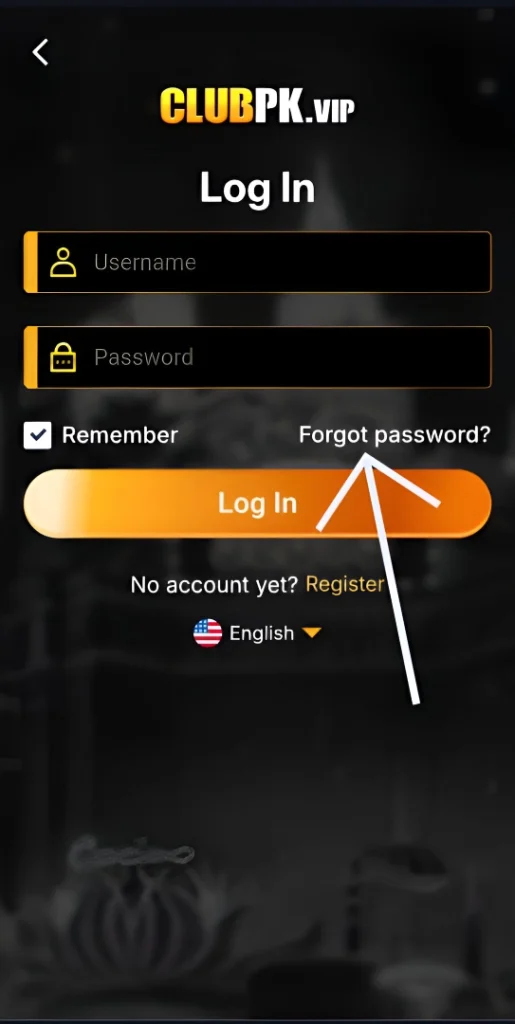
2. Go to the Login Page
- Tap or click on the Login button.
- Below the login fields, you’ll see an option that says Forgot Password?
3. Select “Forgot Password”
- Click on Forgot Password to start the recovery process.
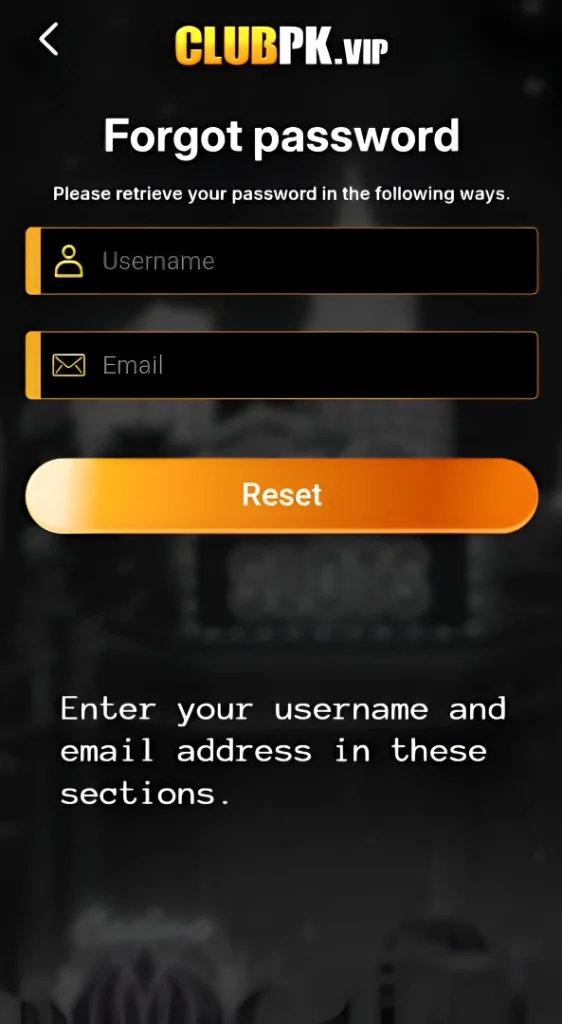
- This will take you to the Password Retrieval page.
4. Enter Your Account Details
- On the retrieval page, type in your username and an email address.
- Don’t worry if you never verified your email earlier in the game—the system only needs a valid email so it can send you the reset link.
- What matters most is that your username is correct.
5. Confirm and Submit
- After entering your details, click the OK or Submit button.
- Club PK will now verify your information.
6. Check Your Email
- Open your inbox for the email address you entered.
- Look for a password reset email from Club PK.
- If you don’t see it, check your spam or promotions folder.
7. Reset Your Password
- Inside the email, click the reset link provided.
- You’ll be redirected to a secure page where you can create a new password.
- Choose a strong password that’s easy for you to remember but hard for others to guess.
8. Login With Your New Password
- Return to the Club PK app or website.
- Enter your username and your new password.
- You should now have full access to your account again.
Tips for a Strong Password
- Use at least 8–12 characters.
- Mix uppercase, lowercase, numbers, and symbols.
- Avoid using your name, birthday, or simple sequences like 12345.
- Update your password regularly for extra security.
Final Thoughts
Resetting your login password on Club PK Game is a straightforward process that ensures you never lose access to your account. Many players reset their password not only when they forget it, but also when they want to secure their account after suspicious activity or simply update to a stronger password.
FAQs
Read the following FAQs and their answers for quick help.
1. Can I reset my password multiple times?
Yes. You can reset your password as often as needed, but it’s best to choose a strong one and stick with it.
2. Is the password reset process safe?
Yes. The reset link is sent directly to your email, ensuring only you can access it.
3. Can I use my old password again?
No. For security reasons, you’ll need to create a new password.
4. What if I don’t receive the reset email?
Check your spam or promotions folder. If it’s still missing, try again with the correct username and a valid email address.
5. Can I reset my password without the app?
Yes. You can reset it directly from the official Club PK website using the same steps.
One Comment